On-device AI for yacht and boat inspections
Write snag descriptions from photos, dictate notes, summarise and translate reports — all on your phone, with no upload and no signal needed.
Inspection reports are only as good as the descriptions in them, and writing clear descriptions on a hot deck or in a noisy engine room is hard. YachtSnags adds AI tools that help you write faster and more clearly — without sending your client's photos to the cloud. Everything runs on the phone or tablet using Google's on-device technologies, including Gemini Nano on supported phones.
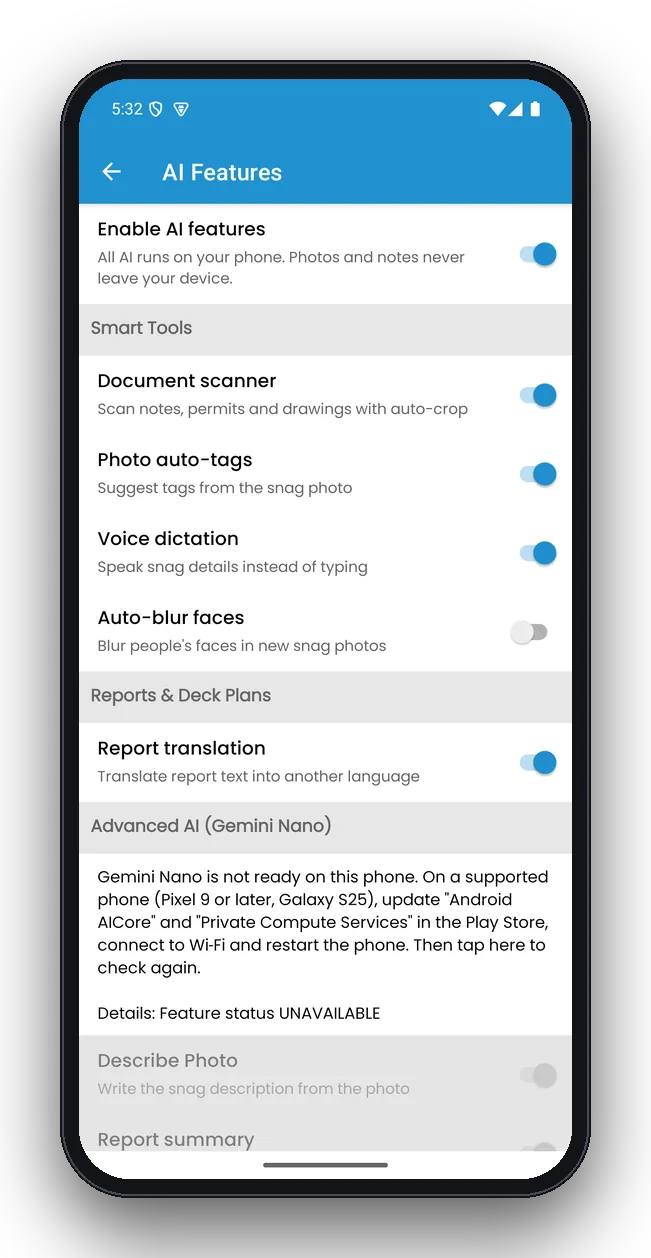
Your photos never leave your device
Because processing happens on the phone, the AI works offline and your client's vessel stays confidential. One switch turns everything on or off.
- No account, no cloud upload
- Works at anchor or offshore
- Each tool can be switched on separately
What the AI can do
Smart tools run on all supported devices. Advanced AI needs a phone with Gemini Nano (for example Pixel 9 or later, Galaxy S25).
Describe photo
Write the snag description from the photo, ready to edit.
Clean up notes
Fix spelling and grammar in a description with one tap.
Report summary
Add an AI summary to the start of the PDF report.
Report translation
Translate report text for owners, yards or crew in another language.
Voice dictation
Speak while you inspect; the text goes straight into the snag.
Document scanner
Scan notes, permits and drawings with auto-crop.
Photo auto-tags
Get tag suggestions based on what is in the photo.
Auto-blur faces
Blur people's faces in new snag photos.
Detect compartments
Read cabin and compartment names on a deck plan and create locations.
Example: from photo to snag description
You photograph a corroded stanchion base on the foredeck and tap Describe Photo. The AI drafts something like:
“Corrosion and staining at the base of a stainless steel stanchion on the foredeck. Surface pitting visible around the mounting plate; sealant appears cracked.”
You add the side and the action — “starboard, frame 34; remove, clean, re-bed and re-seal” — and the snag is done. The AI gives you a head start; you stay in charge of the final wording.
AI report summary
On supported phones, YachtSnags can add a short summary to the start of the PDF report: how many snags were found, how many are critical or overdue, which areas have the most issues and what to fix first. It is generated from your report data and clearly labelled as AI-generated.
Which devices support which tools?
| Tool | All supported devices | Phones with Gemini Nano |
|---|---|---|
| Voice dictation | Yes | Yes |
| Document scanner | Yes | Yes |
| Photo auto-tags, face blur | Yes | Yes |
| Deck-plan compartment detection, location QR codes | Yes | Yes |
| Describe photo, clean up notes | No | Yes |
| AI report summary, report translation | Translation: yes | Yes |
AI questions
What does the AI do?
On supported phones, on-device AI can write a snag description from a photo, clean up spelling and grammar, add a summary to the start of a report and translate report text. Voice dictation, a document scanner, photo auto-tags, face blurring and deck-plan reading are also built in.
Do my photos go to the cloud for AI?
No. YachtSnags runs its AI on your device using Gemini Nano and on-device tools. Photos and notes are not uploaded for AI processing.
Which phones support the advanced AI features?
Advanced AI uses Gemini Nano, which is available on recent flagship Android phones such as Pixel 9 or later and Galaxy S25. The rest of the app, including voice dictation and the document scanner, works on all supported devices.
Can I turn the AI off?
Yes. A single switch in Settings turns all AI features on or off, and each tool can be enabled separately.
Should I check AI-written text?
Yes. The AI is a writing assistant. Always read the description or summary before sharing — AI summaries are marked in the report so readers know.
Does the AI work without internet?
Yes. Once the on-device model is available on your phone, the AI tools work offline. Some phones download the Gemini Nano model once over Wi-Fi.
Try the AI tools on your next walk-round
Free to download on Android and iOS. Works offline on phones and tablets.