How YachtSnags works: run a yacht inspection in 6 steps
A complete walkthrough of a vessel inspection with YachtSnags — from setting up the project to a signed-off PDF report. Most first inspections take under 15 minutes to set up.
YachtSnags follows the way marine surveyors, captains and shipyard QA teams already work: walk the vessel, record each defect with a photo, assign it, track it and report on it. The difference is that the report builds itself as you go, and every photo, mark-up and status update stays with the right snag. Watch the video for a 3-minute overview, or read the step-by-step guide below.
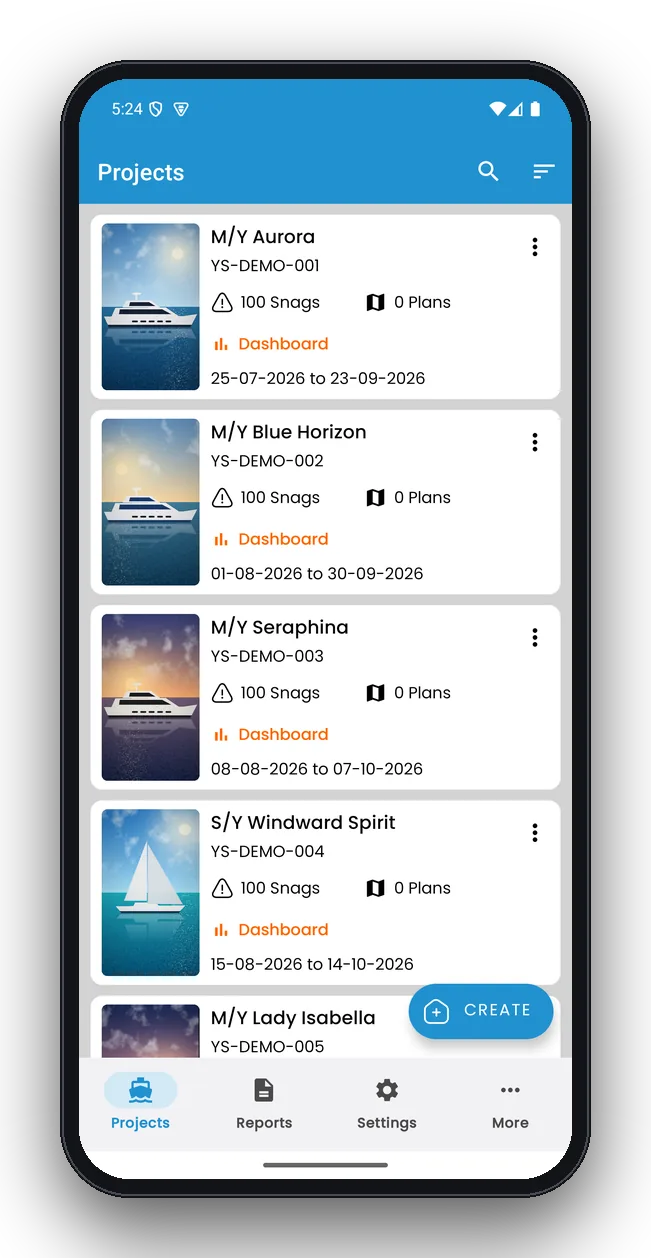
Create a project for the vessel
Start with one project per boat, survey or yard period. Enter the vessel name and type, the reference number, the owner or client and the inspector. These details appear on the cover of every report, so you only type them once.
- Use one project per job: “M/Y Aurora – 2026 refit” is clearer than one project for every visit
- Add your company logo once in Settings for branded reports
- Rename statuses, priorities and trades to match how your yard or practice works
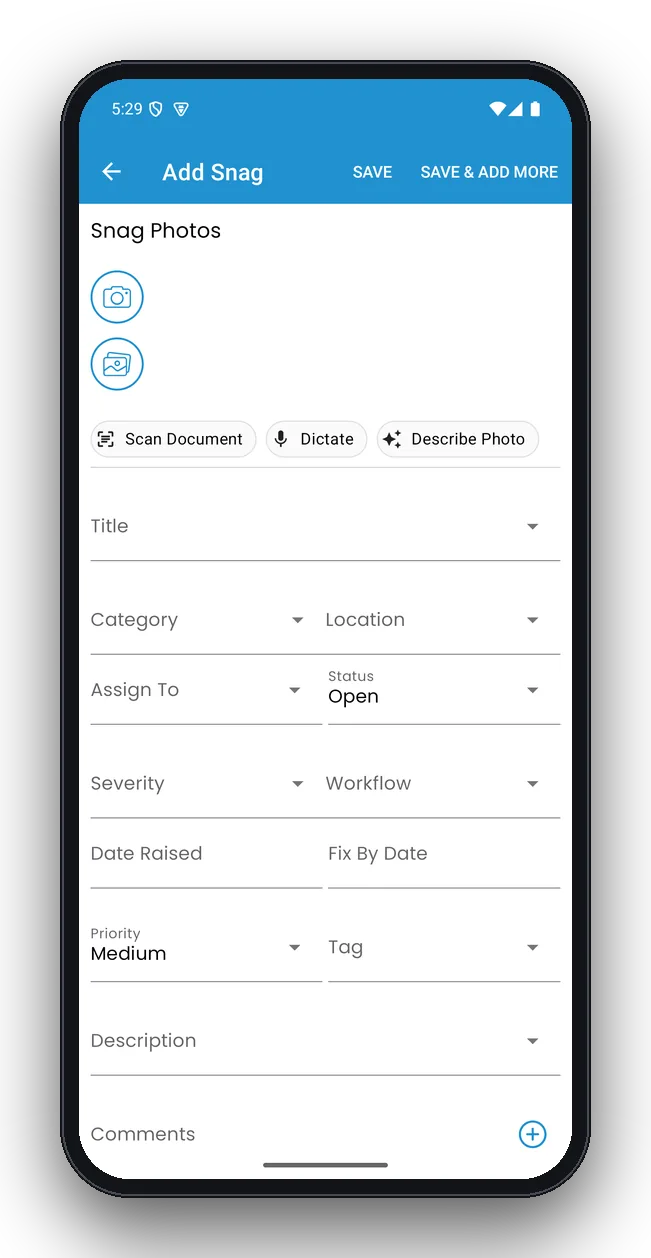
Walk the boat and log snags
Follow a fixed route — exterior, guest areas, crew areas, technical spaces — and log each defect the moment you see it. Take a photo, give the snag a short, specific title, pick the location and responsible trade, then set the priority and due date.
- Add up to 10 photos per snag: one wide shot for context, one close-up
- Use voice dictation when your hands are busy
- On supported phones, tap Describe Photo and let on-device AI draft the description
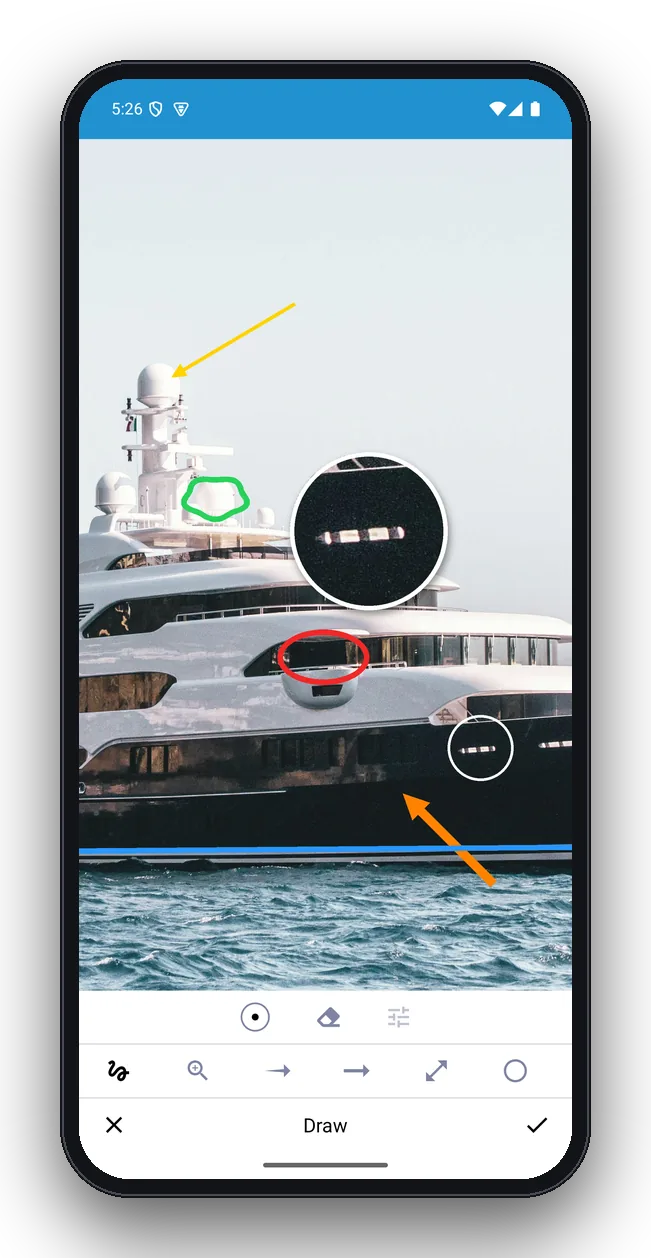
Mark up the photos
Open a photo and mark exactly what needs fixing. Circle the defect, add an arrow and a short label, or use the zoom loupe to enlarge a small detail like a hairline crack. The original photo is kept untouched.
- Use red for defects and green for reference points
- Keep labels short — the description carries the detail
- Mark-ups appear in the PDF report next to the snag
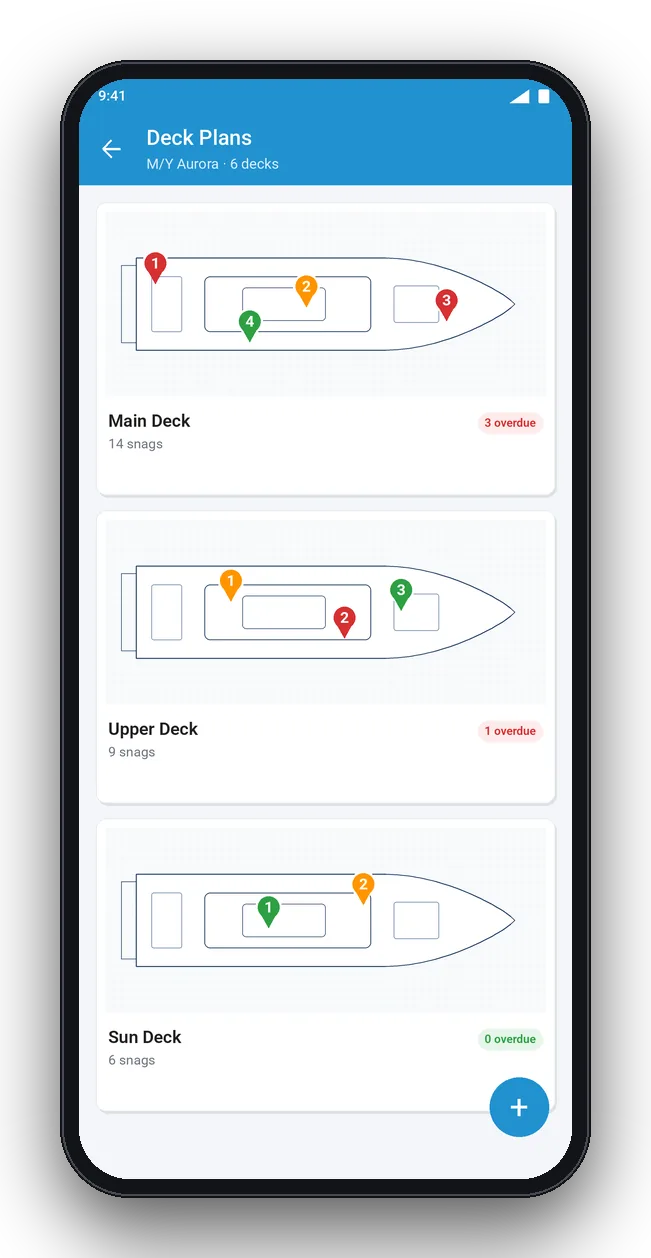
Pin snags on the deck plan
Import the general arrangement or scan a paper deck plan with the camera, then drop a numbered pin where each snag is. Contractors and new crew can find any item without a guide.
- One plan per deck, plus engine room and tank deck
- Tap a pin to open its snag
- Print location QR codes and stick them on bulkheads
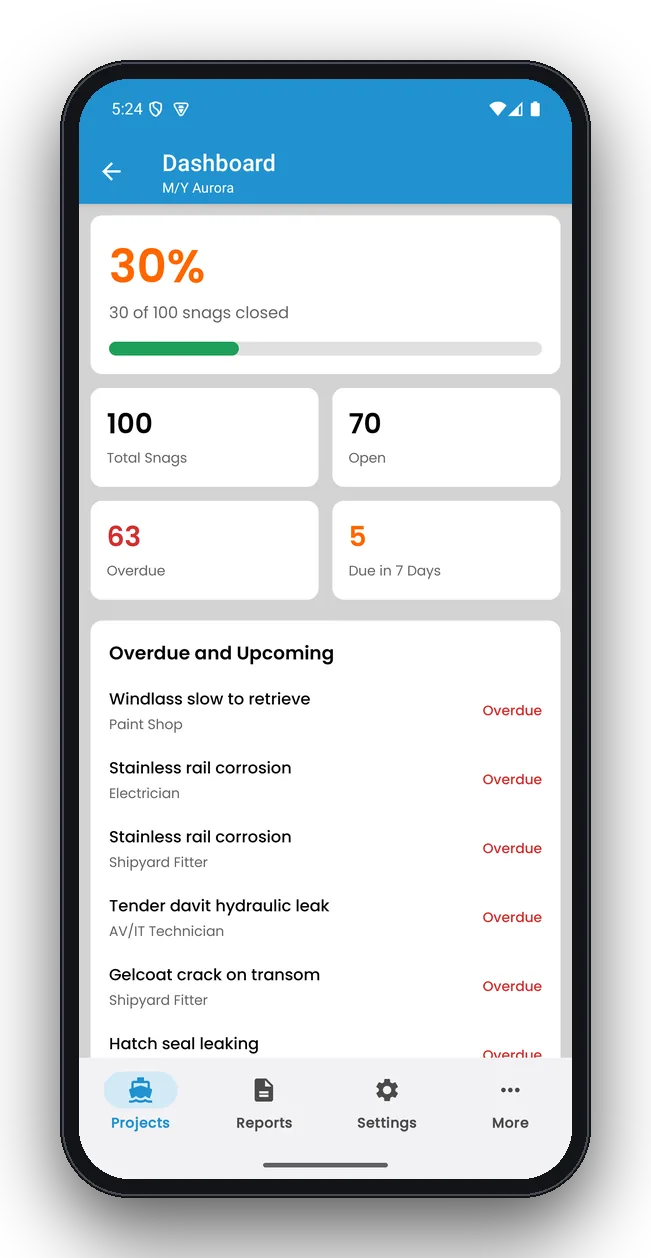
Track every snag to sign-off
As work progresses, update each snag: open, in progress, ready for inspection, closed. The dashboard shows how many items are done, open, overdue and due this week, and lists the most urgent first.
- Filter by trade to give each contractor their own list
- Close a snag only after you have inspected the fix
- Add a close-out photo as proof of the repair
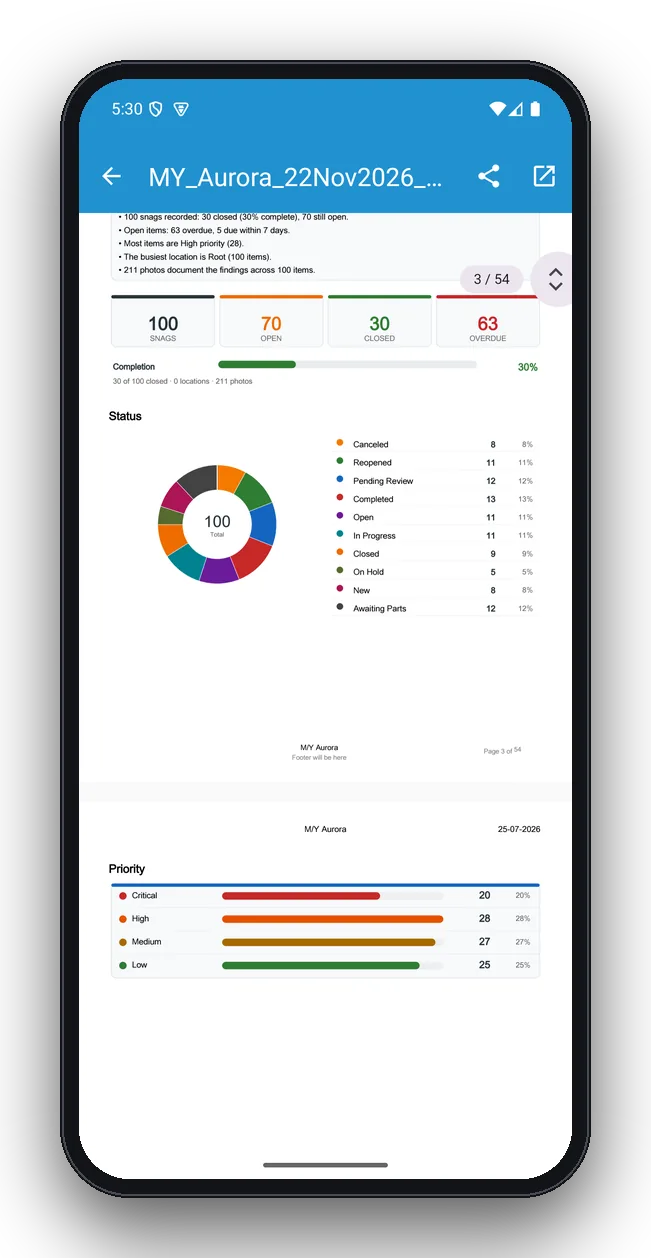
Create and share the report
Choose what to include and generate the report. YachtSnags builds a branded PDF with a cover, key findings, totals, a completion bar and charts by status and priority, followed by every snag with its photos, mark-ups and comments. Export to Excel when the yard wants a spreadsheet.
- Add an AI summary at the top on supported phones
- Collect signatures from inspector, captain or owner
- Share by email, WhatsApp, Google Drive or any app
Before your first inspection
- Charge your phone or tablet and clear storage for photos — a big survey can have several hundred.
- Set up your terminology: statuses, priorities and trades that match your yard, fleet or survey practice.
- Add your logo and contact details so every report is branded.
- Get the deck plans from the builder or management company, or plan to scan the paper copy on board.
- Turn on the AI tools you want in Settings → AI Features: voice dictation, document scanner, photo tags and, on supported phones, Gemini Nano.
Tips for faster, clearer inspections
- Walk the boat in the same order every time so nothing is missed between visits.
- Write titles the contractor can act on: “Varnish lifting on cap rail, port quarter” beats “varnish”.
- Take the wide photo first, then the close-up; circle the defect on the close-up.
- Set due dates against real milestones — sea trials, delivery, charter start, survey date.
- Use the tablet for review meetings: list and details sit side by side.
Working offline at sea
YachtSnags stores every project, snag, photo and report on the device, so the whole workflow — logging, mark-up, AI tools and PDF creation — works with no signal. Share the report whenever you are back in range, or save it to the device and send it later.
Re-inspections and handovers
When a contractor says an item is fixed, set it to “ready for inspection”. On the next walk-round, filter by that status, check each repair and either close it with a photo or reopen it with a comment. At handover, export a final report with every snag's status and collect signatures from the yard and the owner's representative.
Phone or tablet?
Use whichever suits the job. Phones are ideal for one-handed logging on deck and in tight technical spaces. Tablets show the list and the snag details side by side and make deck plans and reports easier to review with others. YachtSnags runs on Android phones and tablets, iPhone and iPad.
Questions about the workflow
How long does a yacht inspection take with YachtSnags?
Setting up a project takes a couple of minutes. Logging a snag with a photo takes seconds, so the inspection itself takes about as long as the walk-round. The report is ready as soon as you finish.
Can several people inspect the same boat?
Each person can run the inspection on their own device and share the PDF or Excel export. Many teams split the boat by area or trade and combine reports for the progress meeting.
Do I need internet to create the PDF report?
No. Reports are generated on the device. You only need a connection to send them.
Can I reuse the same set-up for every boat?
Yes. Your terminology, statuses, priorities, trades and branding are reused across all projects.
Start your next inspection in minutes
Free to download on Android and iOS. Works offline on phones and tablets.